 GETGOODAPP COLLECTION
Squeeze PDF: PDF Compressor for Mac
Reduce PDF file size for email, uploads and archiving on Mac, with selectable quality and local or remote compression.
Available on the Mac App Store.
A closer look.
Squeeze PDF is a Mac PDF compressor for reducing file size before emailing, uploading or archiving documents. Its official description covers documents and scanned PDFs, with quality choices and separate local and remote compression modes.
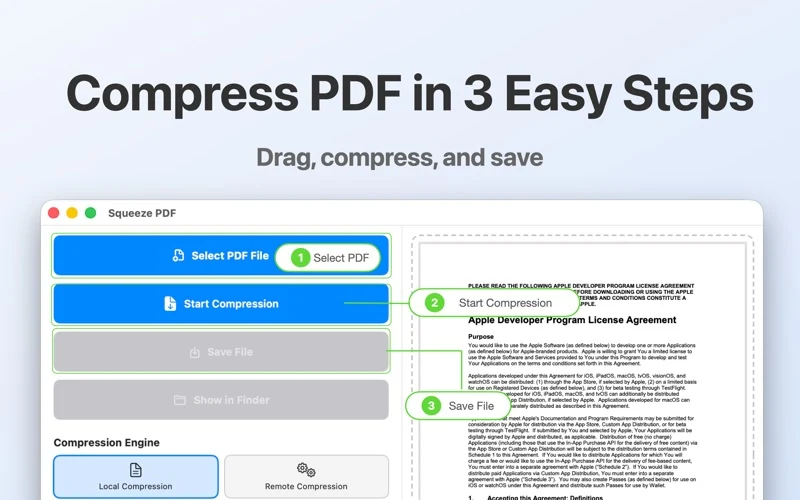
The official workflow is to select or drag in a PDF, choose a compression engine and quality level, start compression, review the file-size comparison and save the result to a chosen folder. The image below is an official store workflow illustration, not a new independent operation test.
Compression results depend on the PDF’s content, existing image encoding and the selected settings. Image-heavy or scanned documents may have different scope for reduction than mostly-text or already-optimized PDFs; some files may not become noticeably smaller. This is general PDF guidance, not a measured result for this app. Keep the original and check the saved pages and readability.
Local and remote engines are distinct options in the official listing. Remote mode must not be presented as processing confined to your device. Its service location, upload scope and retention/deletion rules have not been verified; the support page provides a contact for those details.
Interface languages
Apple lists29 interface languages, including English, Simplified Chinese and Traditional Chinese. This is an interface-language list, not a claim about OCR or supported document languages.
Download and related tools
Screenshots
Core features
- Import a PDF by selection or drag and drop, as described in the official listing.
- Choose among multiple compression quality levels; exact preset names and numeric values are not independently verified.
- Choose local or remote compression engines. No comparison of their performance is claimed here.
- Compare file sizes before and after processing in the app.
- Save the resulting file to a folder of your choice.
How it works
Official workflow, not an independent test: use Select PDF File or drag in a PDF; select the engine and available quality level; click Start Compression; review the size information; use Save File and inspect the saved PDF. Labels Select PDF File, Start Compression and Save File appear in the official English workflow image. Keep the original until you have checked the result.
Platforms, downloads & licensing
Mac
- Version
- 1.1.0
- Updated
- 2026-03-31
- System requirements
- macOS26.0 or later, explicitly listed by Apple for this macOS app. This is not an iPhone/iPad listing and no older-macOS compatibility is implied.
- Platform-specific features
- PDF compression, quality levels, local or remote engines, file-size comparison and saving.
- Price & license
- Paid Mac App Store download. Checked19 October2026: US$2.99 in the US; ¥22 in China. The retrieved product page shows no in-app purchase items; regional availability, current price and purchase terms remain subject to Apple.
- Free tier limits
- No free trial or exact usage/file/page limits have been confirmed. Remote-engine entitlements, any additional service charges and upgrade rights have not been verified; the listed app price is not a promise of unlimited service.
Frequently asked questions
How do I make a PDF smaller on Mac?
The official Squeeze PDF workflow is to select or drag in a PDF, choose quality and an engine, start compression, review the size comparison and save. This website has not independently tested the current store binary.
Will every PDF shrink by the same amount?
No fixed reduction is promised. Content, existing compression and chosen settings affect the result; mostly-text or already-optimized PDFs may have little room for further reduction. No current-version compression benchmark is presented here.
Is the output lossless or guaranteed to preserve everything?
Those guarantees have not been verified. Review the saved pages and any required document features against your original; this page does not promise that every format, form, signature or layout is preserved.
Is compression entirely offline?
The official listing offers local and remote engines. They are different modes, so an offline-only promise for the whole app would be inaccurate. Remote processing and retention details remain to be confirmed.
Is this a free app or a subscription?
The verified listing is a paid download. No trial, subscription plan or complete additional-charge/remote entitlement policy has been confirmed; consult the current regional store and support for purchase terms.
Related guides & articles
Related articles will appear here when published.